There are several options for purchasing access to Vantage. Your instructor may provide you with information on how to buy access. Detailed descriptions of the options are provided below.
Purchasing directly from Sage is the simplest and recommended method. Other options include purchasing from your campus bookstore, such as Barnes & Noble (Yuzu) or Follett (Kortext), or through VitalSource.
TABLE OF CONTENTS
DIRECT PURCHASE FROM SAGE - RECOMMENDED
You can purchase access to Vantage directly from the Sage Vantage website. To start, simply register for Vantage using your school email address.
For the best user experience, ask your instructor to provide the Vantage CourseLink; use it to start your registration and access your free 14-day grace period for the specific product in use. Purchase access when you are ready, right from within your Vantage dashboard!
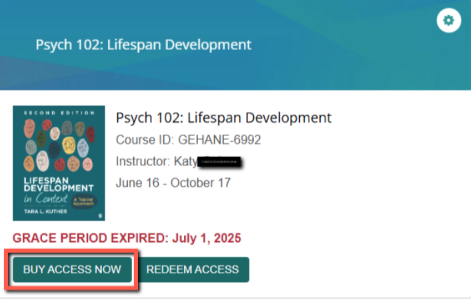
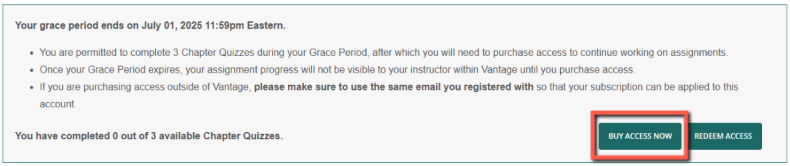
You can also visit Sage Publishing and search for the title of ISBN of the Vantage product in use for your course.
CAMPUS BOOKSTORE
Barnes & Noble Campus Bookstore (Yuzu - fulfilled by VitalSource)
When purchasing Vantage through your Barnes & Noble campus bookstore, the access will be provisioned via the Yuzu platform and VitalSource.
Important First Steps:
- Ask your instructor if your course is integrated into your school’s Learning Management System (LMS). If it is, go to your course LMS and click through to Sage’s Vantage website to continue. If it isn’t, ask your instructor to provide the Vantage CourseLink to get started.
- Once you are at the Sage Vantage website via either method, register for an account and start your Grace Period for free trial access to your course.
- If you choose to purchase access from your bookstore after your Grace Period ends, complete your bookstore purchase with the same email you used for your Grace Period, and click on the confirmation email with the “Access My Digital Content” link in Yuzu. Follow the instructions provided by the bookstore to complete the activation of access to the Vantage course materials.
- For important step-by-step instructions, view the Barnes & Noble User Access Guide.
Follett Campus Bookstore (fulfilled by Kortext)
When purchasing Vantage through your Follett campus bookstore, the access will be provisioned via Kortext. You will redeem two codes. Use the first to enter Follett's Kortext Library, where you will find your Sage Vantage course tile. Selecting the course tile will reveal a second access code which you will use to access your Vantage material. Note that you cannot use the first code you are given to access Vantage--it is for Kortext only.
For complete, step-by-step instructions, including how to register for Vantage and check your systems, go to "How to redeem Follett and Kortext codes to access Vantage."
To begin:
- Ask your instructor if your course is integrated into your school’s Learning Management System (LMS). If it is, go to your course LMS and click through to Sage’s Vantage website to continue. If it isn’t, ask your instructor to provide the Vantage CourseLink to get started.
- Once you are at the Sage Vantage website via either method, register for an account and start your Grace Period for free trial access to your course.
- Follow the instructions provided by the bookstore along with those in the code redemption guide here.
- Follett also offers purchasing guides:
Online Follett purchase: Gain Access to Your Digital Materials (Online Purchase) - Follett Higher Education Group
In-Store Follett purchase: Gain Access to Your Digital Materials (In-Store Purchase) - Follett Higher Education Group
Campus Bookstore – Physical Access Card
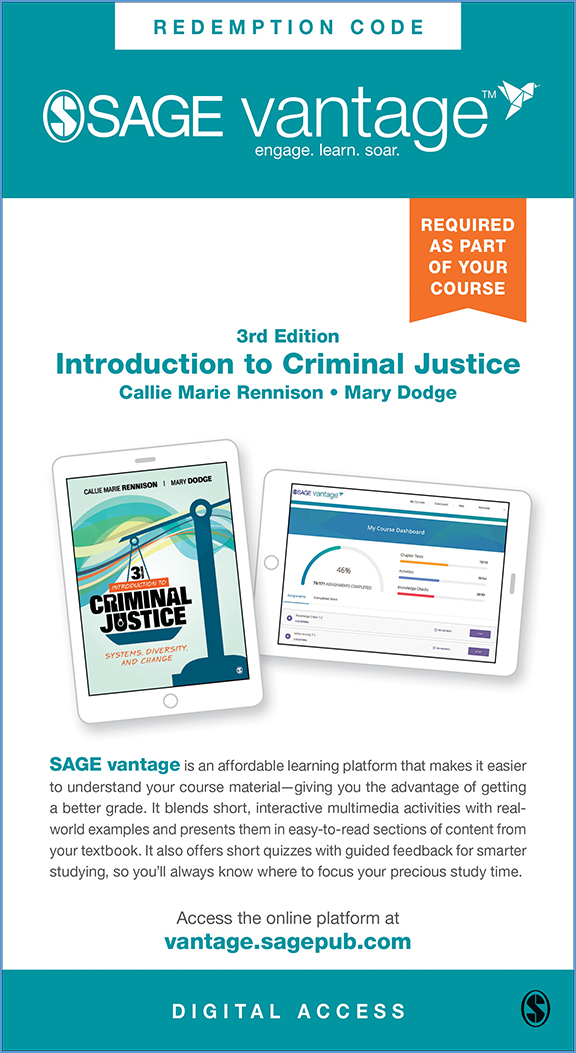
When purchasing Vantage through your campus bookstore, you may receive a physical card printed with an access code. This access code card may be sold as a standalone item or could be bundled with other course materials such as the printed textbook. The access code is used in conjunction with your instructor's Vantage Course ID. Redemption instructions are included on the card.
Example of a physical access card:
VITALSOURCE
You can purchase a digital access code through VitalSource. To complete purchase on the VitalSource website, you will need to create an account with VitalSource.
Once you complete the transaction on the VitalSource website, follow the prompts in your VitalSource account to launch Vantage, activate and access your Vantage course. You will then use the Vantage website to access your course, unless instructed by your instructor to use a link in the LMS.
INCLUSIVE ACCESS AND EQUITABLE ACCESS
Access to your course may be part of an Inclusive Access or Equitable Access offering negotiated by your school and requires no additional action on your part. Joining Vantage through Inclusive Access will result in the best price for you when compared to other purchase options. Register for your course using the 14-day grace period to opt into the course. Your school may “brand” your Inclusive Access program; any questions about Inclusive Access should be directed to your bookstore.
REFUND REQUESTS
Go here for help with a Vantage purchase or for information about requesting a refund.