There are several options for purchasing access to Vantage.
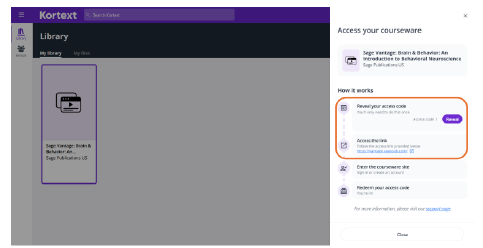
When you purchase access to Vantage from a Follett campus bookstore you will redeem two codes. Use the first to enter Follett's Kortext Library, where you will find your Sage Vantage course tile. Selecting the course tile will reveal a second access code which you will use to access your Vantage material. Note that you cannot use the first code you are given to access Vantage—it is for Kortext only.
Table of Contents
Vantage Registration and Code Redemption Directions for a Follett Campus Bookstore Purchase
Vantage Registration and Systems Check
Important steps prior to using codes from Follett and Kortext:
- Check with your instructor. Ask your instructor if your course is integrated into your school’s Learning Management System (LMS), such as BlackBoard or Canvas. If it is, go to your course LMS and click through to Sage’s Vantage website to continue. If it isn’t, ask your instructor to provide the Vantage Course ID Link to get started.
- Register for a Vantage account. Once you are at the Sage Vantage website via either method, register for an account. If you are prompted for payment on an access code at this stage, choose the Grace Period option for free trial access to your course.
- Check your browser settings before continuing. The Kortext activation process requires your browser to allow the cookies and scripts needed to communicate with Sage Vantage. Follow instructions here to enable third party cookies.
- Run the Sage Vantage browser/system check. Go to the Systems Settings Check to identify and address any issues before continuing.
Follett and Kortext Code Redemption
Directions for using codes after you have registered for your instructor's Vantage course:
- Purchase Vantage from your Follett bookstore and follow instructions. Once you complete payment and checkout you will receive two emails from Follett with instructions. The first email is your order confirmation.
- Select the access URL in the second Follett email (order update) to log in to Kortext and create an account.
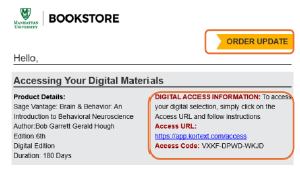
- Redeem the first code (provided in your bookstore email) to access your Kortext Library. This code is only for redemption in Kortext. It will not provide access to your Vantage course.
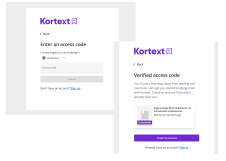
- Select your Sage Vantage course tile in your Kortext Library to reveal and copy the second code.
- Return to your instructor's Vantage course through your Learning Management System, or if it is not integrated, via the Vantage Course ID link provided by your instructor via Sage.
- Apply the redemption access code by selecting “Redeem Access” in the Vantage Grace Period banner. You will have a full subscription applied to your Vantage account and there is no need to return to your Kortext Library.
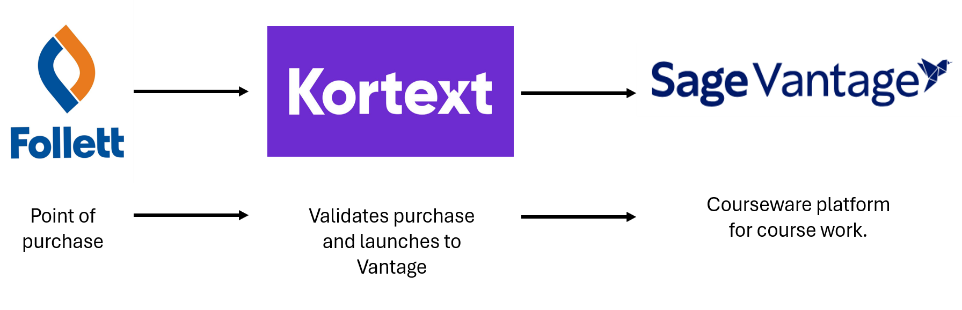
Additional Follett Instructions
If you would like more information about purchasing through a Follett store, visit the applicable Follett link below:
Online Follett purchase: Gain Access to Your Digital Materials (Online Purchase) - Follett Higher Education Group
In-Store Follett purchase: Gain Access to Your Digital Materials (In-Store Purchase) - Follett Higher Education Group