Sage Vantage Support
➤Support Home ➤Contact Support ➤Student FAQs ➤Instructor FAQs ➤Vantage Instructor Training (833) 591-2849 Toll Free

Monday - Friday:
8:00 a.m. - 11:00 p.m. ET

Saturday:
11:30 a.m. - 8:00 p.m. ET

Sunday:
11:30 a.m. - 11:00 p.m. ET

After Hours Basic Support begins after 11 p.m. ET
(and 8 p.m. Saturday)

Systems Status
Support Home > Student FAQs > Using SAGE Vantage > Can I Change the Font Size of the Vantage Text?

Can I Change the Font Size of the Vantage Text?

Student Using SAGE Vantage

Answer

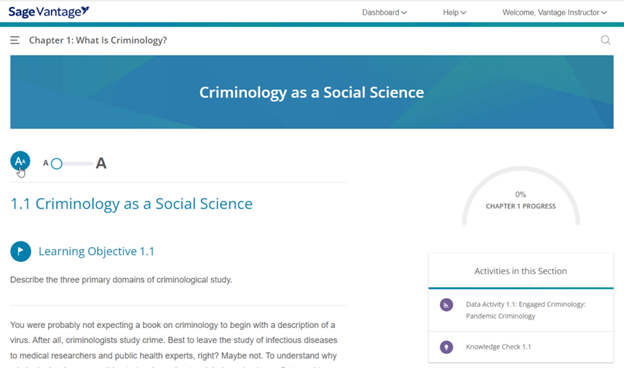
You have the option to increase the font size of the readings within Vantage by selecting the font size icon at the top of the content. Font size selections will continue throughout the session and on repeat visits to Vantage.

A screenshot showing font size selection

Related articles

  • Can I read Vantage offline?
  • Citations: How do I cite Vantage content?
  • Completing Activities in Sage Vantage
  • Completing Knowledge Checks and Chapter Tests
  • Does Vantage have flashcards?
  • Does Vantage include print page numbers?
Back to Student FAQs  |  Contact Support

Privacy Policy Cookie Policy Accessibility Legal Notices
